Skip to content
SubstyHelp center
API docs Open Substy
Getting startedAI & automationMessages & scriptsTeamWorkspaceBilling & earnings
Messages & scripts
Messages & scripts
Overview
Set Fixed or Smart pricing for a script templateAdd messages after PPV mediaUnderstand what script templates doGenerate a PPV caption with AIConfigure and reuse scriptsReview script performanceAdd a free opening message to a scriptCreate and manage script templatesFix a script that is Invalid for AI
Create a Solo BundleHow Solo Bundles work with Scripts
Set up Split Inbox and filtersSend and schedule Mass MessagesUse Message ManagerNavigate MessagesTurn off AI Chatter for one fanSend a direct message with media or PPV contentSend a timed messageManage fan lists and segmentsManage fan details and notesTelegram messages, media and Stars
Help centerScripts & PPV

Fix a script that is Invalid for AI

Open in ChatGPTAsk questions about this pageOpen in ClaudeAsk questions about this page

Check AI mode, message templates, attached media, price, and Enabled status when a script is marked Invalid for AI.

1 min readUpdated September 9, 2026

A script can be active for AI only after it meets every eligibility requirement. If it shows Invalid, check the items below for the creator you selected.

Check the requirements

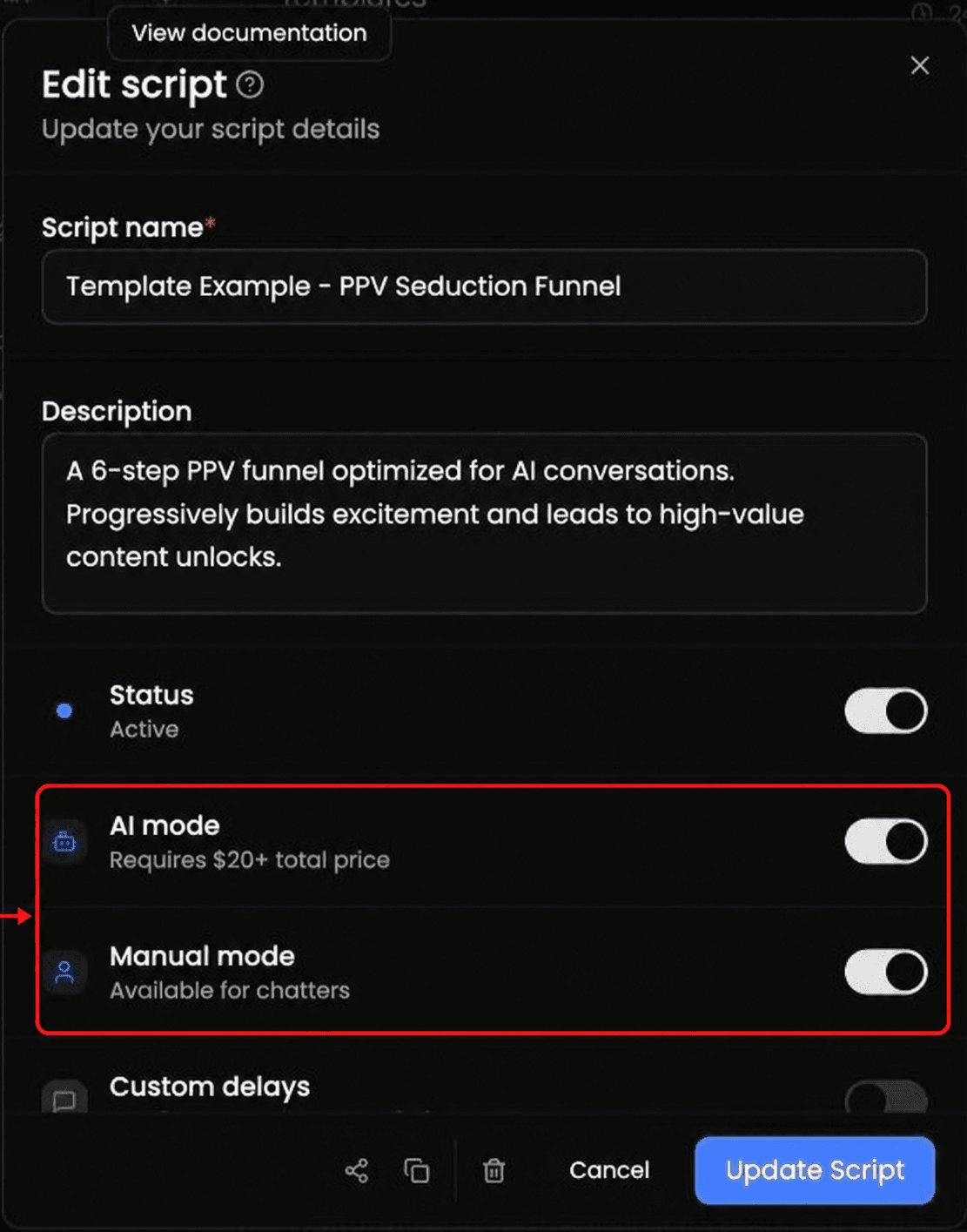
  1. Turn on AI mode for the script.

  2. Add at least one message template.

  3. Attach at least one media item to a message template. A script with templates but no media is still Invalid for AI.

  4. Make the script's total price meet the minimum displayed for that creator.

  5. Set the script to Enabled.

Edit script dialog with AI mode and Manual mode highlighted by a red box and arrow.

The minimum shown in an example may not match every creator. Follow the minimum displayed for the creator you are editing.

If it still says Invalid

Compare the script's total with the minimum shown for that creator, then recheck the message template, attached media, AI mode, and Enabled requirements. If the warning says No media in this AI script, attach media to at least one template.

Custom delays control timing. They are separate from AI mode and Manual mode.

Related articles

Set Fixed or Smart pricing for a script templateAdd messages after PPV mediaUnderstand what script templates do

Still need help? Open Substy and contact support.

On this page

Check the requirementsIf it still says Invalid

Ask AI

Answers from the Substy help center, with sources.

What would you like help with?

Answers from the Substy help center, with sources.