
Créer une automatisation
Créez et validez une automatisation depuis CRM > Automations avec l’éditeur visuel actuel.
Ouvrez CRM > Automations pour le créateur sélectionné. Si les contrôles de création sont indisponibles, demandez à un owner ou à un admin de vérifier votre accès pour ce créateur.
Démarrer l’automatisation
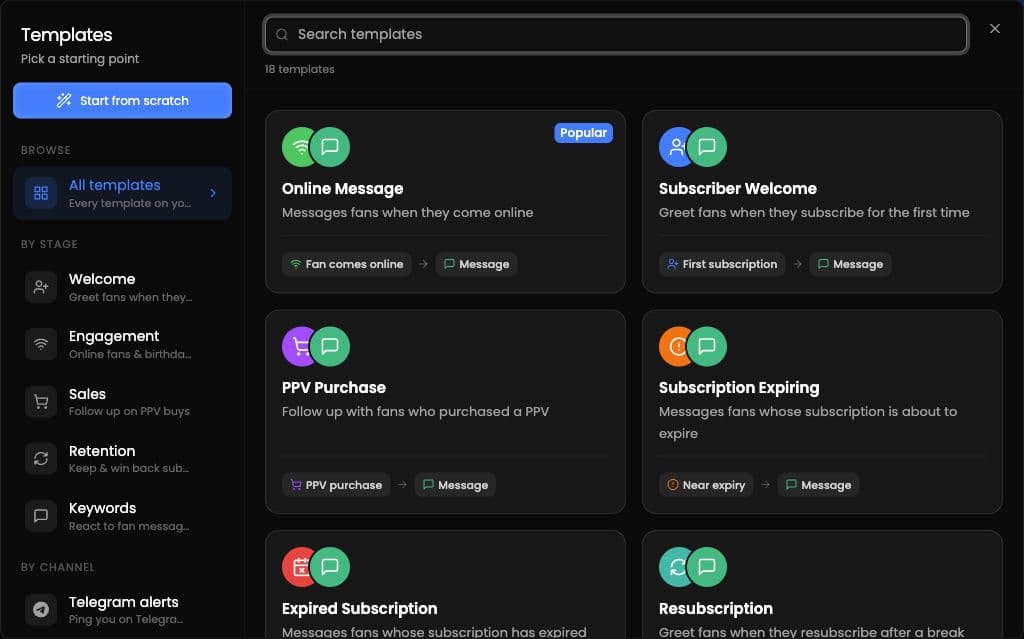
Choisissez un modèle ou Start from scratch. Les modèles qui ne correspondent pas à l’offre ou à la plateforme actuelle du créateur peuvent être masqués ou verrouillés.
Construire l’automatisation
Dans l’éditeur visuel :
-
Saisissez un nom d’automatisation.
-
Choisissez un déclencheur.
-
Définissez l’audience.
-
Définissez le moment et la fréquence. Si l’automatisation est planifiée, choisissez une date et une heure futures.
-
Ajoutez une ou plusieurs actions et complétez leurs détails requis.
Les actions actuelles sont Send Message, Stop AI, Notify Employee et Add to List.
Create New Automation devient disponible une fois le nom, le déclencheur, l’action, les détails requis de l’action et tout planning futur requis complétés.
Vérifier avant de créer
Preview as fan est disponible pour les automatisations de messages. Simulate effectue un essai à blanc sans envoyer de messages.